

Final Camera Ready Submission Instructions
Final Camera Ready Manuscript Preparation
All submissions are required to upload a Final Camera Ready Manuscript as the last step of the paper submission process. Submissions without a Final Camera Ready Manuscript will be withdrawn after the Final Camera Ready Manuscript deadline.
As you prepare your final camera-ready manuscript make sure you:
- Include all author identifying information that you previously removed during the double-anonymous review process.
- IEEE EDUCON 2026 reviews were completed with a double-anonymous review process. Please ensure your Final Camera Ready manuscripts are updated to include all relevant author identifying information before uploading. No changes to the author list may be made after the Final Camera Ready Manuscript Deadline.
- Consider modifying your paper to address the reviewers’ comments
- To see your reviews, proceed to your submission page on EDAS through the link in your notification email or by navigating to My… > My Papers. From this page, you will select and click the title of the submission you would like to open.
- Re-read your paper for spelling and grammatical errors. NO changes to your manuscript may be made after the Final Camera Ready Deadline. The version you submit will be the version published in IEEE Xplore. There are no exceptions.
- Ensure that your abstract is <250 words and is not formatted as a structured abstract.
- The final paper abstract should be that of a traditional paper abstract (i.e., something that describes the problem, educational setting, methods used, and overview of findings) rather than the format of the Structured Abstract initially submitted for review.
- Format your paper to that required by IEEE EDUCON using the IEEE paper template (https://www.ieee.org/conferences/publishing/templates.html).
- Verify your manuscript through PDF eXpress (Instructions below)
File Requirements
- Your paper must comply with the following specifications:
- Paper Length:
- Full Paper (maximum 10 pages)*
- Short paper (maximum 5 pages)*
- Work-in-Progress (maximum 3 pages)*
*Paper lengths include references.
- Paper Size: US_Letter
- Fonts: Embed ALL fonts in your PDF file. Avoid the use of Type 3 fonts.
- File Format: Adobe PDF (.pdf)
- Do NOT page number your paper
- Do NOT apply security settings to your PDF file.
In order to have your work published, at least one author of an accepted paper must register, submit the final version by the deadline in the required format, and present it in person at the conference.
FINAL CAMERA READY MANUSCRIPT UPLOAD
If you or a fellow author do not already have an account, visit the IEEE EDUCON 2026 Submission Portal, click the link to create a new account, and follow the steps below.
- Create your profile. Only the five fields with the red asterisk are required. *It is very important that your name and affiliation associated with your EDAS account are correct and match the name and affiliation that will be listed on your paper. These fields are first & last name, affiliation (company or organization), country, e-mail address, and status. When the fields are filled in, check the Privacy Policies box and click the Add Person button. [note: if you select the USA as the country, you will get a message asking for your state]
- You will receive an e-mail containing your password. Your email address and the given password must later be used to access the system during the following steps, so be careful to remember them.
- You can then return to the EDAS log-in page (http://www.edas.info) and change your assigned password to one that is easier to remember. To do this, click on the My Profile tab, and then click on change your password. Be sure to record your username, password, and ID number for later reference.
PREREQUISITES
The following must be completed before your Final Camera Ready Manuscript can be uploaded:
- You must Register for the conference and provide your Registration Confirmation Number when prompted for a Registration Code to upload your manuscript to EDAS.
- Those registering a paper must select Author Full Conference or Author Limited Conference Registration. Conference Only or Workshop registration does NOT cover paper publication. Each registration only covers (1) paper. Registrants may select and pay an Additional Paper Fee to cover up to (2) total papers under one registration. Registration is not yet open but will open in early January. For more information, please visit the Registration Webpage.
- You must complete the eCopyright Form. There is a link to your unique form on each submission’s individual webpage.
- You must designate your paper presenter within EDAS.
- You must verify your manuscript through IEEE PDF eXpress. The paper submission system will reject your file if your file is not created using IEEE PDF eXpress.
SUBMITTING TO EDAS
A detailed step by step can be found below
- Navigate to your paper you would like to update
- Ensure you are Registered for the conference with an Author Full Conference or Author Limited Conference Registration.
- Ensure you have completed the eCopyright Form for your paper
- Designate your selected presenter
- Verify you have added all author identifying information and ensured the EDAS author list matches your manuscript exactly
- Read over the Preparing Your Manuscript section above and ensure you meet all requirements
- Verify your Final Camera Ready Manuscript through IEEE Xpress (this will create a new file and is the only version EDAS will accept)
- Upload your IEEE eXpress verified document to EDAS using the cloud-shaped upload button for Final Manuscript (shown below)
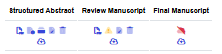
- Verify your manuscript has been successfully uploaded by refreshing your paper page. Successful uploads will show a PDF symbol under Final Manuscript (as seen under Review Manuscript in the above screenshot).
- Please upload your Final Camera-Ready Manuscript to the EDAS system no later than January 20, 2026 11:59 PM EST. Late submissions will not be accepted. NO changes to your manuscript may be made after the Final Camera Ready Deadline. The version you submit will be the version published in IEEE Xplore.
- For troubleshooting help, please visit our Paper Upload FAQ Webpage. Please review this page thoroughly before contacting IEEE EDUCON 2026 Staff.
PDF eXpress Instructions
Creating your PDF eXpress Account
Log in to the IEEE PDF eXpress TM site
First-time users should do the following:
1. Select the New Users - Click Here link.
2. Enter the following:
- 67543X for the Conference ID
- your email address
- a password
3. Continue to enter information as prompted.
An Online confirmation will be displayed and an email confirmation will be sent verifying your account setup.
Previous users of PDF eXpress need to follow the above steps, but should enter the same password that was used for previous conferences. Verify that your contact information is valid.
Contacting PDF eXpress Support
Access the Publications Support Center for IEEE PDF eXpress.
If you do not find an answer in the Find Answers tab, go to the Ask A Question tab.
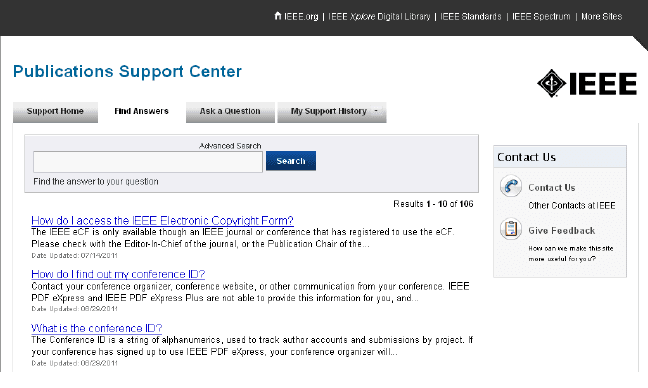
Your question will be forwarded to IEEE PDF Support and answered within 3 business days.
IEEE COPYRIGHT NOTICE
If authors would like to post their papers electronically on any website, any FTP site, or any other electronic dissemination technique, they must include the IEEE Copyright notice on the initial screen displaying the IEEE-copyrighted material.
Each accepted contribution to EDUCON 2026 must be accompanied by a signed Copyright Form. The copyright form should be filled out and signed by one author, preferably the primary author.
PROBLEMS & FURTHER INFORMATION
For any problem or further information, please, contact the Conference Manager.